
Download OpenBuckets – Secure Cloud Storage Vulnerability Scanner
Overview
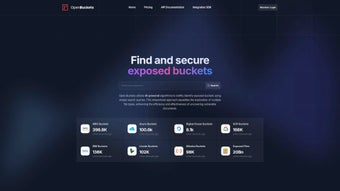
OpenBuckets is a web‑based platform that has quickly become a go‑to solution for security professionals, DevOps engineers, and researchers who need to locate misconfigured cloud storage buckets across the three dominant providers – Amazon S3, Google Cloud Storage, and Microsoft Azure Blob. The service continuously crawls public bucket listings, updates its internal index several times per day, and presents the results through an intuitive dashboard. By leveraging an AI‑driven search algorithm, OpenBuckets not only discovers open buckets but also ranks them by exposure risk, allowing users to focus on the most critical findings first.
In addition to bucket discovery, the platform incorporates a powerful secret‑scanning engine capable of detecting more than 150 patterns of sensitive data, such as API keys, OAuth tokens, private certificates, and personal identification numbers. This dual capability—identifying both misconfigured storage containers and embedded secrets—creates a comprehensive guardrail for cloud data security. Whether you are performing a one‑off audit, integrating continuous bucket monitoring into a CI/CD pipeline, or feeding findings into a larger threat‑intel platform, OpenBuckets offers the speed, accuracy, and flexibility required to stay ahead of attackers.
The solution is built with a clean, responsive UI that works on any modern browser, making it accessible to beginners while still providing deep query options for seasoned analysts. With a free tier that includes generous query limits and daily database refreshes, OpenBuckets lowers the barrier to entry for organizations of any size that want to improve their cloud posture without compromising on depth or reliability.
Key Features & Installation Guide
Feature List
- Automated daily updates of open‑bucket databases for AWS S3, GCP Storage, and Azure Blob.
- AI‑enhanced search engine that ranks results by exposure risk and relevance.
- Secret scanning engine capable of detecting over 150 sensitive data patterns.
- Customizable filters for bucket name, region, file type, and exposure date.
- RESTful API with full documentation for seamless integration into security tooling.
- Export options in CSV, JSON, and PDF for reporting and compliance purposes.
- Role‑based access control (RBAC) for team collaboration and audit trails.
- Multi‑language support (English, Spanish, German, Japanese) for global teams.
Installation & Usage Instructions
Getting started with OpenBuckets is intentionally straightforward. After navigating to the official website, click the Download Free button, which prompts you to create a secure account using either an email address or single‑sign‑on (SSO) via Google or Azure AD. Once registered, you’ll receive an activation link; after confirming, you’ll be directed to the main dashboard where the first scan can be launched.
The core platform runs entirely in the browser, so no local software installation is required for the SaaS version. For organizations that need on‑premises deployment or wish to operate in air‑gapped environments, OpenBuckets provides Docker images and a Helm chart for Kubernetes. Deploying via Docker is a single‑line operation:
docker run -d -p 8080:80 openbuckets/openbuckets:latest
After the container starts, open http://localhost:8080 in your browser, log in with the credentials you created earlier, and you’re ready to begin scanning. The RESTful API is reachable at https://api.openbuckets.io/v1/. To perform a programmatic search, send a POST request to /search with a JSON payload that defines the provider, region, and any filters you require. Detailed examples are included in the official API documentation.
For continuous monitoring, use the built‑in scheduler to define recurring scans. You can select specific cloud providers, target regions, and set alert thresholds. Results can be forwarded to Slack, Microsoft Teams, or any SIEM platform via webhook, ensuring that security teams receive real‑time notifications whenever a new open bucket is discovered or a secret is exposed. This workflow eliminates manual polling and keeps your remediation process tightly integrated with existing incident‑response tools.
Compatibility, Pros & Cons
OpenBuckets is a cloud‑native SaaS solution, meaning the primary interface works on any modern web browser (Chrome, Edge, Firefox, Safari) across Windows, macOS, and Linux desktops. For on‑premises deployments, the Docker image runs on any operating system that supports Docker Engine, and the Helm chart is compatible with any distribution that can host a Kubernetes cluster, including Red Hat Enterprise Linux, Ubuntu, and Amazon Linux 2. The responsive design also allows analysts to review findings on Android or iOS tablets without sacrificing functionality, making it a truly cross‑platform tool.
Pros
- Comprehensive coverage of the three leading cloud storage providers.
- Daily automated database refresh ensures up‑to‑date intelligence.
- AI‑driven ranking reduces false positives and highlights critical exposures.
- Secret scanning for over 150 data types adds a valuable layer of risk detection.
- RESTful API and webhook support enable seamless integration with existing security stacks.
- Free tier provides generous query limits for small teams and individual researchers.
- Strong community and regular updates from the development team.
Cons
- Advanced features like multi‑user RBAC and on‑premises deployment require a paid subscription.
- Search performance may vary during peak usage hours due to shared cloud resources.
- While the UI is intuitive, the API documentation could benefit from more real‑world use‑case examples.
- Secret scanning may generate a high volume of alerts for large enterprises, necessitating careful tuning.
- Limited native support for less common cloud providers (e.g., Oracle Cloud Object Storage).
Frequently Asked Questions & Conclusion
Is OpenBuckets free to use?
Yes, OpenBuckets offers a free tier that includes up to 5,000 searches per month, daily database updates, and basic secret scanning. Larger teams or enterprises can upgrade to a paid plan for higher limits and advanced features.
Which cloud providers does OpenBuckets support?
OpenBuckets currently scans Amazon S3, Google Cloud Storage, and Microsoft Azure Blob Storage. The roadmap includes support for Oracle Cloud and IBM Cloud in upcoming releases.
Can I integrate OpenBuckets with my SIEM?
Absolutely. OpenBuckets provides webhook endpoints and a robust REST API that can push alerts directly to Splunk, Elastic Stack, QRadar, or any system that accepts JSON payloads.
How does the secret‑scanning engine work?
The engine uses pattern‑matching algorithms and machine‑learning classifiers to identify 150+ types of sensitive data, including API keys, OAuth tokens, private certificates, and personal identification numbers. It scores each finding by confidence level, allowing you to prioritize remediation.
Is there an on‑premises version for air‑gapped environments?
Yes, OpenBuckets offers a Docker image and a Helm chart for self‑hosted deployments. This version includes the same scanning capabilities but requires a separate license.
Conclusion & Call to Action
In the fast‑moving world of cloud security, visibility is the first line of defense. OpenBuckets delivers that visibility with a blend of AI‑powered discovery, continuous data refresh, and deep secret scanning—all wrapped in a user‑friendly web interface. Whether you are a solo researcher hunting for open buckets or a large organization looking to embed cloud storage monitoring into your security operations center, OpenBuckets scales to meet your needs without sacrificing performance or ease of use.
Ready to protect your cloud assets from accidental exposure? Download OpenBuckets now and start scanning for open buckets today. Take advantage of the free tier to evaluate its capabilities, and consider the premium plan for enterprise‑grade features and dedicated support.



.png)



